# Can I schedule a text message campaign?
> Source: https://support.associationsphere.com/can-i-schedule-a-text-message-campaign | Updated: 2024-10-17T13:35:34Z
Yes, when sending a text by using the Actions menu from the Constituents, Memberships, Events, Event Attendance, Auction Bidders, or Auctions grid, you have the option of scheduling the message.
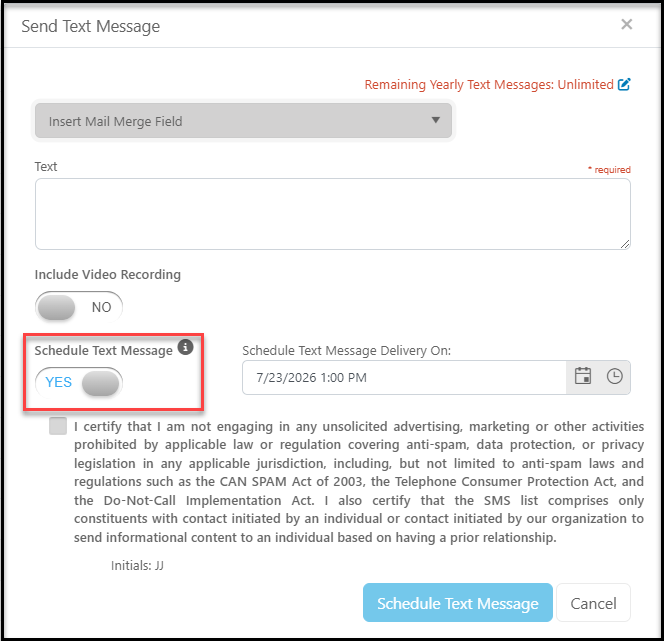
If you wish to schedule a text message to be sent later you can toggle the **Schedule Text Message**button to**YES**. Once turned on, you can enter in the desired date and time for within the **Schedule Text Message Delivery On** field. After setting the date and time, check the box to confirm that you are not engaging in spam, then click the blue **Schedule Text Message** button in the bottom right of the dialog box to schedule the message.
 Your message will be scheduled to be sent at the prescribed date and time and can be reviewed by navigating to Workspace>Reports>Text Message Queue. This grid will show all past and future campaigns including when they are/were scheduled and their status. Below are the details of what is listed on the Text Message Queue grid.
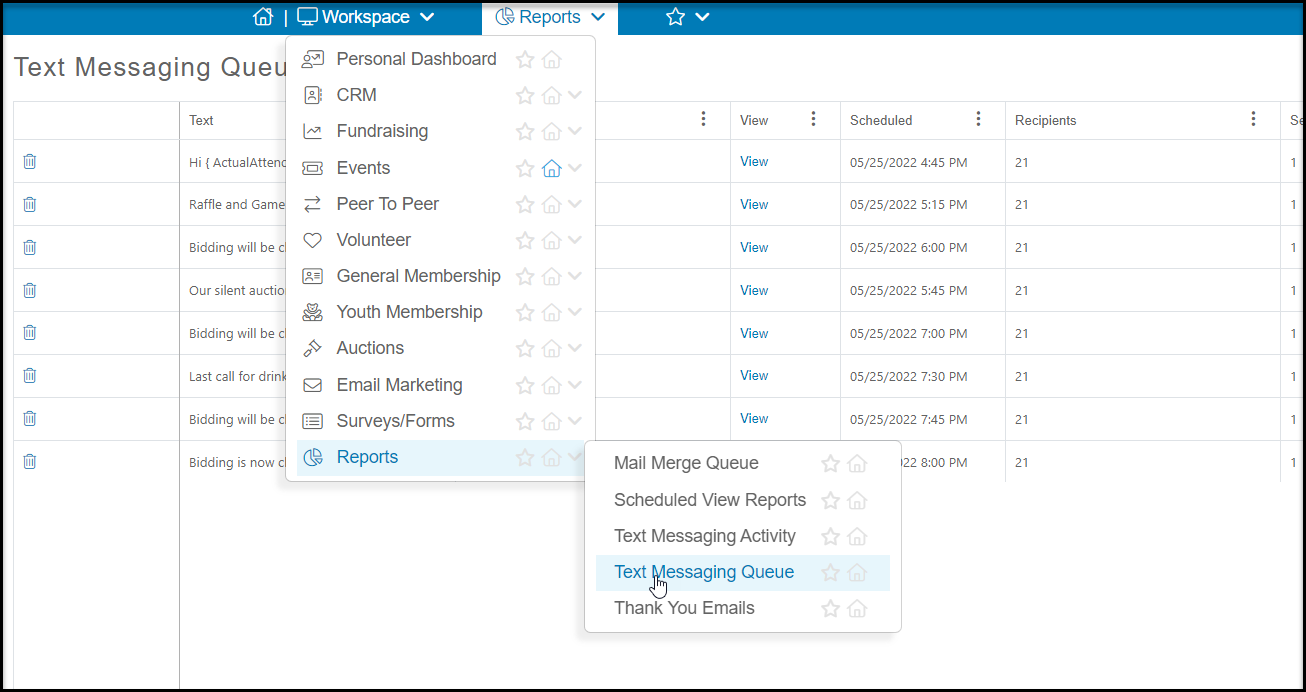 **Trash Can Icon** – Click to delete a Text Message Campaign
**Text** – What content will be sent to the recipients within this Campaign.
**Status** – The current state of your Campaign
**Queued** – Your Campaign is schedule for the future
**Error** – There was an issue with your Campaign. The most common cause is that a constituent included in the campaign did not have a Mobile phone number on file.
**Executed**– Your Campaign was sent out.
**View –**See what Constituents were included in your Campaign
**Scheduled** – What date and time was or is your Campaign schedule for
**Recipients** – How many Constituents were included in your campaign
**Sent** – How many total Text Messages were sent out
**Not Deliverable** – How many total Text Messages could not be delivered
**Duplicate** – How man Constituents included in your campaign were duplicates.
**Date Created** – on what date was this Campaign created
**Sent By** – Which software user scheduled the Campaign
**Trash Can Icon** – Click to delete a Text Message Campaign
**Text** – What content will be sent to the recipients within this Campaign.
**Status** – The current state of your Campaign
**Queued** – Your Campaign is schedule for the future
**Error** – There was an issue with your Campaign. The most common cause is that a constituent included in the campaign did not have a Mobile phone number on file.
**Executed**– Your Campaign was sent out.
**View –**See what Constituents were included in your Campaign
**Scheduled** – What date and time was or is your Campaign schedule for
**Recipients** – How many Constituents were included in your campaign
**Sent** – How many total Text Messages were sent out
**Not Deliverable** – How many total Text Messages could not be delivered
**Duplicate** – How man Constituents included in your campaign were duplicates.
**Date Created** – on what date was this Campaign created
**Sent By** – Which software user scheduled the Campaign