# How do I increase or edit the auction add-on quantity?
> Source: https://support.associationsphere.com/how-do-i-increase-or-edit-the-auction-add-on-quantity | Updated: 2024-04-08T20:12:00Z
1. A quantity limit can be placed on the add-on items.
2. To view and edit the quantity available, go to the auction page editor.
3. Click on the **Auction Setup** tab and then the **Add-ons** tab.
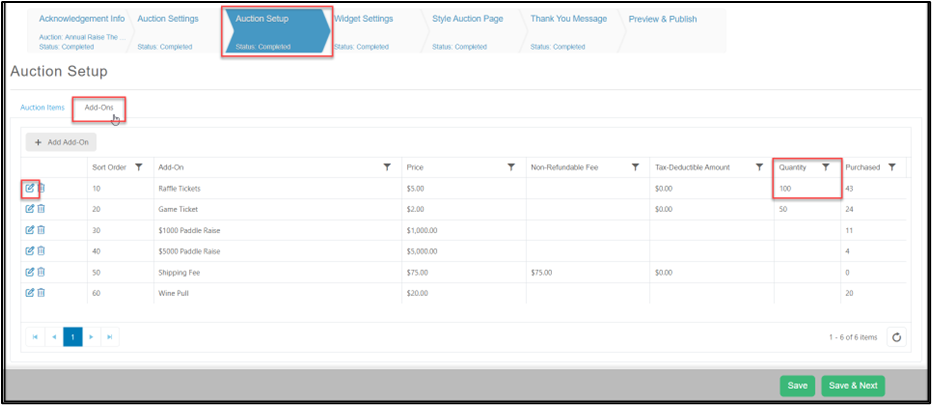 4. The add-ons items and the current quantity can be viewed on the grid.
5. Next to the item, click on the edit icon to change the quantity.
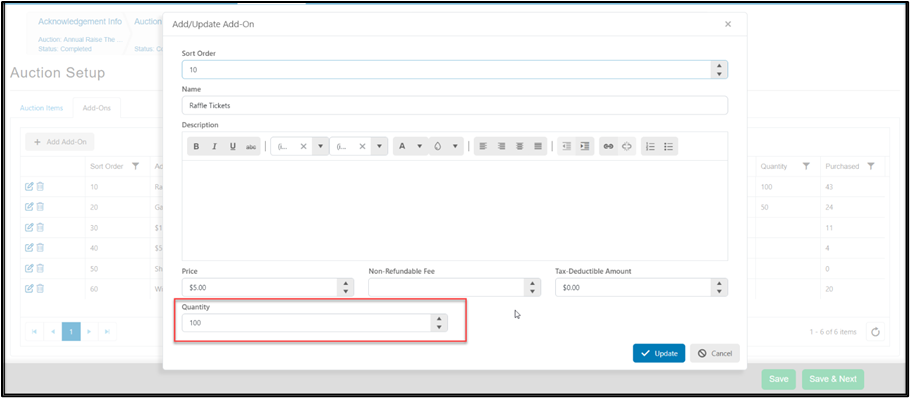
6. Edit the **Quantity** as desired and click on the blue **Update**button to save the changes.
4. The add-ons items and the current quantity can be viewed on the grid.
5. Next to the item, click on the edit icon to change the quantity.
6. Edit the **Quantity** as desired and click on the blue **Update**button to save the changes.