# What Membership Expiration options are available?
> Source: https://support.associationsphere.com/what-membership-expiration-options-are-available | Updated: 2026-09-08T02:58:47Z
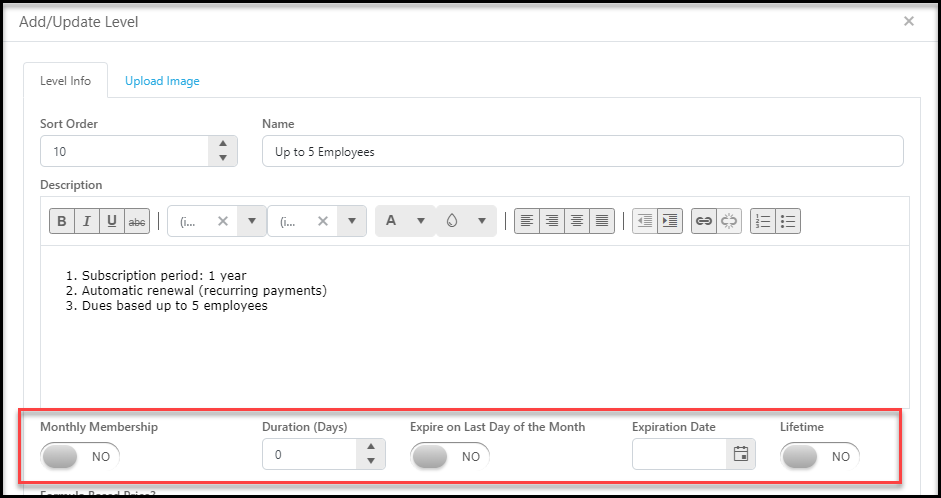
Each membership level can only have one type of expiration date and there are several options including:
**Monthly Memberships** - monthly memberships expire at the end of each month and automatically renew for the next month via a credit card. The member would need to reach out to your organization to cancel a monthly membership. To activate monthly memberships, toggle **Monthly Memberships** to **YES**.
**Rolling Memberships** - Rolling memberships have a duration entered, typically 365 days, set in the **Duration (Days)** field. This means if you purchase the membership on May 15th, it will expire on May 14th the following year. Rolling memberships also have an option to extend them to the last day of the anniversary month. If **Expire on the Last Day of the Month** is set to **YES**, then the membership purchased on May 15th will expire on May 31st the following year.
****Hard Expiration Date Memberships** - The expiration date is a set date in the **Expiration Date** field for everyone who purchases this level, such as June 30th. Membership levels with hard expiration dates are not renewed in the same membership page and a new page must be created each year. Changing the hard **Expiration Date** field will change the expiration date for everyone with that membership level, which is why a new level or page must be created for renewals. You can learn more about managing renewals with hard expiration dates in this article https://support.donorview.com/en/support/solutions/articles/9000237647-what-is-a-hard-membership-expiration-date-"What is a Hard Expiration Date?"**
**Lifetime Memberships** - With **Lifetime** toggled to **YES**, the software records the transaction throughout the software, but does not assign an expiration date. In the Membership Grid, the **Exp Date** and **Current Membership Expiration Date** fields are blank and there is a check box in the **Is Lifetime** column.