
AssociationSphereHelp center
All articlesContactContact supportSign inSign up
Help center/Transactions & Invoices Module/Donation Pages

How do I put the donate button on my website?

Updated Feb 20, 2025

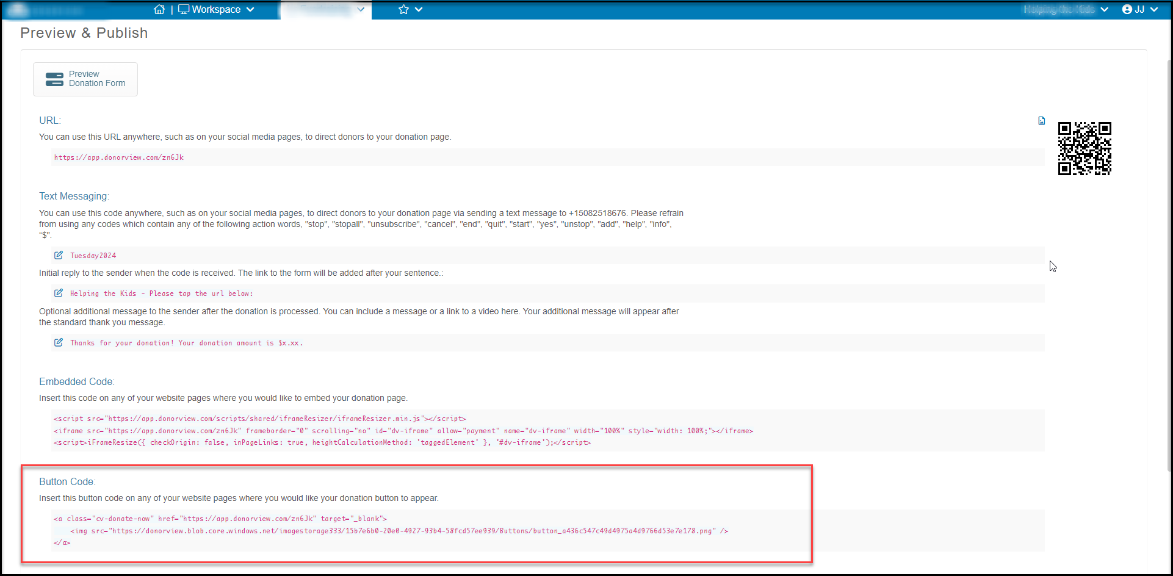
On the “Preview & Publish” step, you will find the button code. Copy the full line of code and paste it into the HTML code of the page on your website that you want to embed the button on.
Was this article helpful?

Related articles

What are the steps to set up an Simple online donation page?How do I create/edit a donation page?What are the steps to set up an Advanced donation page?Can I change the way the online donation form looks?How can I share my Donation Page online?
On this pageOn the “Preview & Publish” step, you will find the button code. Copy the full line of code and paste it into the HTML code of the page on your website that you want to embed the button on.
© ConnectedView LLC
Help centerContact supportPowered by BlueHill