
Invoicing is a way to record a transaction for a constituent to pay at a later time. Invoicing is most often used for membership and event transactions where the constituent wishes to secure the membership or event registration, but wants to mail in a check or forward the invoice to their accounting department for payment.
All invoices created in the software get a unique URL hyperlink so that constituents can pay via credit card if desired. The invoice and unique payment link are tied to the original transaction and will automatically update the information when the payment is recorded.
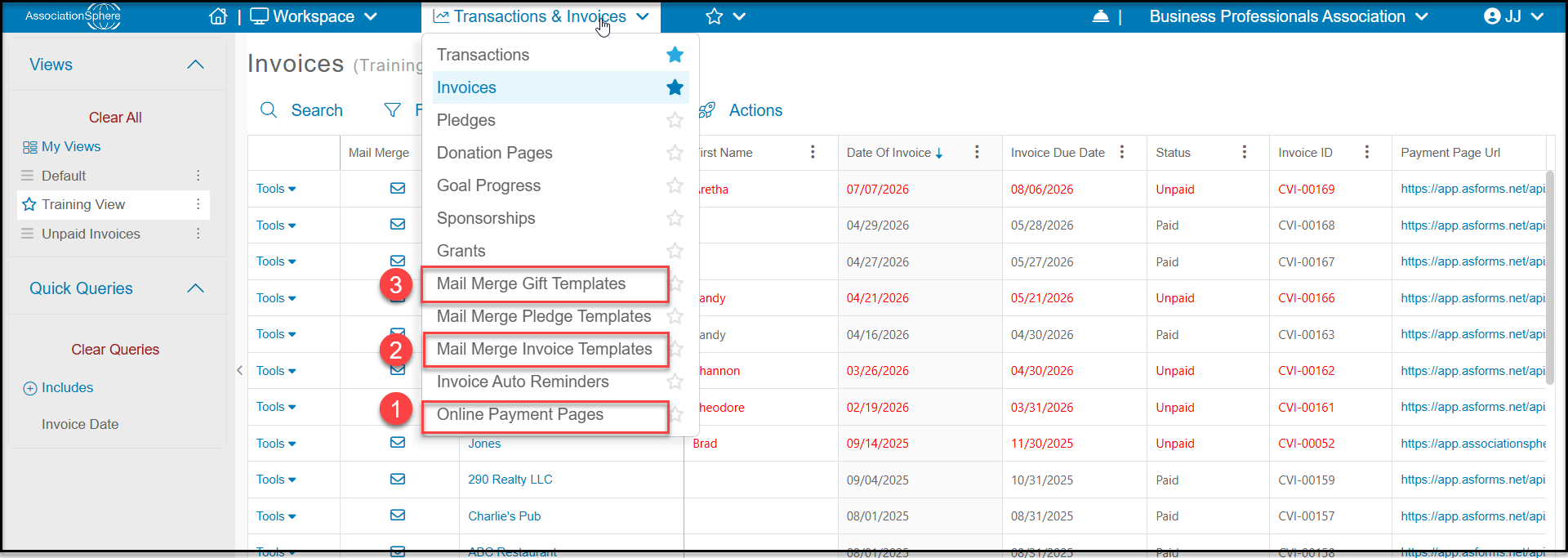
There are several sub-pages in the Transactions & Invoicing module that relate to invoicing including:
- Invoices - which is the Invoices grid which shows a list of all invoices, the constituents associated with them, and their status.
- Mail Merge Gift Templates - used for sending thank you letters and receipts when constituents pay with a method other than credit card, like check or cash.
- Mail Merge Invoice Templates - where you create your mail merge letters to be used as cover letters when sending invoices and reminders.
- Invoice Auto Reminders - like the memberships module, there is a feature to send auto reminders via email for payments due.
- Online Payment Pages - where you can create your custom invoice pages for payments.
In order to start using the invoicing feature you must first do three things:
Step 1 - Create at least one invoice Online Payment Page.
Step 2 - Create at least one Mail Merge Invoice Template to use as a cover letter when sending invoices.
Step 3 - For recording manual invoice payments you will also need to have a Mail Merge Gift Template letter for sending payment acknowledgements or receipts.
Once you have set up your payment pages and mail merge templates, you can add the option for generating an invoice to your membership and event pages.
You can also manually create invoices for transactions that are not related to an event or membership transaction.