
How do I place an online bid for a guest?
Updated Apr 8, 2024·1 min read
Occasionally, you may need to place an online bid on a guest's behalf if they don't want to sign up for the online auction or they are having trouble accessing their portal account.
- Click on the gavel icon from the Auctions grid on the row of the auction item.
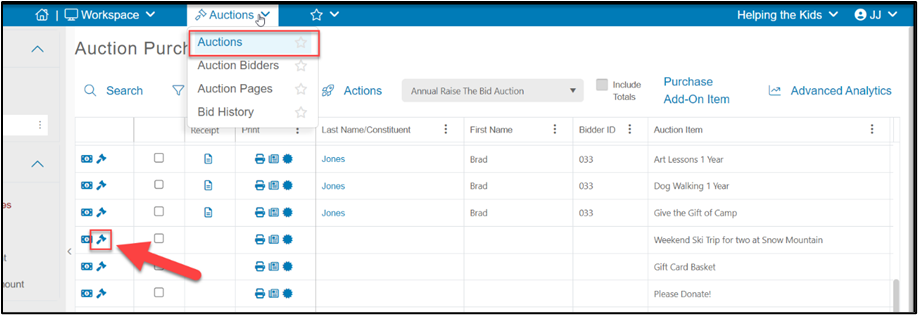
-
Search by bidder number or attendee last name to identify the bidder.
-
Enter the bid amount.
-
Entering the number of bids is optional.
-
Click the blue Assign Bid button to record the bid.
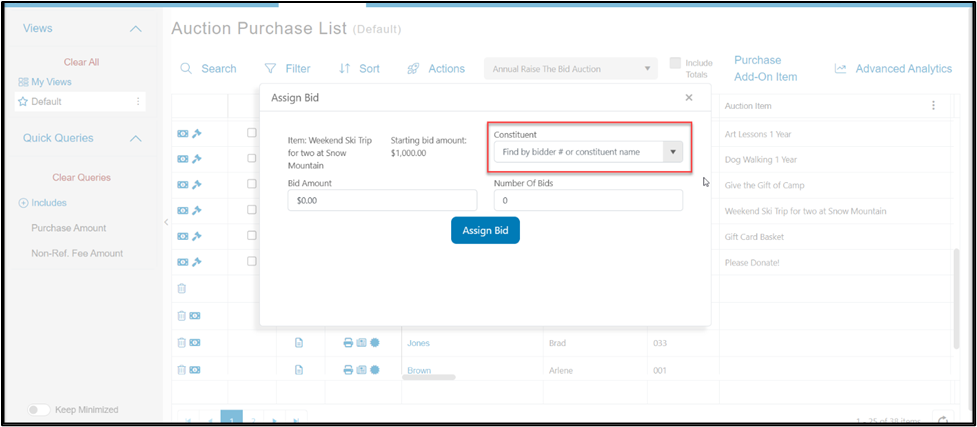
- Note that you can place a bid without having a credit card on file for that bidder.
Was this article helpful?